I am Going to Kill My Smartphone (Part 1)
In this issue SEGFAULT gets fed up with Android and makes plans for migrating her entire life to Linux.
Written 2026-09-22 2522 words.
No I am serious; frankly I am done with the concept of a smartphone!
I am going to get this damn thing out of my life!
I don't remember exactly when I started trying to de-google my phone. I remember being frustrated by default installed apps from getting my very first smartphone. I have never used Facebook, I never wanted it installed. I definitely didn't want its notifications.
My first attempt to properly "synergize" my Android and PC experiences was around 2014 when I first attended Uni. I tried to make a hard break away from using a computer altogether, and installed android on a ageing netbook (remember when those were still relevant?) and downloaded AIDE, an app that let you code CPP and compile it on device. This was the first time I remember fighting back against the push from computer to device. I since then have maintained the argument its not a computer unless you can compile an app for it, on it. (see: self hosting)
Since then I have given up on the paradigm of living purely on the new shiny smartphone ecosystem. You can't build real applications on phones, and even basic tasks like accessing mail, browsing the web, and storing files have become a clumsy and slow experience as cloud services have been forced in as defaults on all mobile devices now. I made a serious effort to remove the remaining google play apps from my phone (with partial success) over a year ago. Knowing my data is securely on my own servers only is worth the price of a slow, barely functional device that effectively just a glorified wrapper around firefox with a camera.
With google's upcoming change to require all app vendors hand over their full identities to be able to publish an APK, and the predicted apocalypse this will cause for non play applications I yet again find myself having to move to protect myself against a rising tide. They truly want everything, apparently that's whats needed to serve an ad these days...
I concede; phones are a lost cause. I am not going to de-google my phone; I am going to de-phone my life.
How to de phone your life.
Making this stick is going to be about software, not hardware. It doesn't matter what we're using as a phone replacement if it can't do the tasks we need. To make this work we need viable alternatives to the cloud driven services I use on my phone. Thankfully here we already have a head start. I don't make use of any cloud streaming services, instead hosting my own media collection. I run a Nextcloud to handle file sharing, save all my files to my own NAS and perform backup with Syncthing. Contacts, calendar, tasks etc are stored with my email provider (Not google) and accessed over webDAV.
So what is my phone up to these days
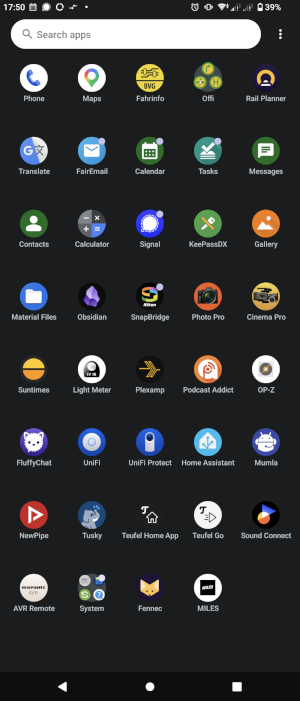 This is my app drawer. Given I made an effort to delete a lot of apps a year ago there's still a lot here. They do however break into a few categories.
Easy to Replace:
The General Purpose Apps are easy to replace. These are Mail, contacts, Google translate, the browser etc, these all do typical office computing tasks that there are dozens of mature capable apps to take over on a different platform. I will be switching to Linux, and will use Evolution to manage my calendar and Mail. Gnome file manager can handle my files and gallery needs. Keepass has an Linux app, and Fennec is a fork of Firefox, my preferred web browser. The only tricky one in this category is google translate, which can be accessed with full functionality via the website.
Communication apps are my most commonly used. I am not on many platforms, and most of these have Linux or web options. The odd one out is Signal, which has a desktop app, which must be linked to either the android or iOS app. This is a holdover to the refusal to allow users to register accounts without a phone number. Thankfully their desktop app is fully functional and an unnofficial CLI client exists which can register the account and link/unlink desktop clients. It can be run as a service on one of my servers hidden away, and every day be run to sync messages to nothing.
Navigation Apps play a surprisingly important roll in my phone's life, especially considering how unreliable Deutsche Bahn is. This section is easy. Gnome maps syncs with many public transit data providers and can fetch mapping data and tiles from OSM. Its excellent and I have already been using it with great success. The tricky one is the official Interrail app. This is the first one to cost me money to remove. I will have to pay for paper tickets to be shipped to me as they don't offer a web only ticketing service.
Media Apps: I host all my own media, with the exception of podcasts and YouTube. For podcasts there is Kasts; for YouTube there is the Web. Plexamp is my music player of choice, and that has a Linux build which I have also been using successfully for years, but there are many other options for playing back music on Linux if you are not a Plex user.
The more specialized apps I have are the important part that make my phone into a digital multi-tool. The Unifi app suite, and home assistant all run from local web servers in my WiFi, the apps are practically web shortcuts, nothing will be lost moving those to Firefox. Like most of the general apps Obsidian will actually be an upgrade on Linux, as its native app is more featured than the android build. Suntimes is a wrapper around a simple algorithm that tells me when golden hour is. (I am a film hipster and I will not apologize) I can look the information up online, or code something up quickly to calculate the times myself.
Harder to Replace:
Sadly light meter is where we need to make some compromises, The app relies on the android camera APIs to get the light level seen by the camera in EV and convert that into settings to put into a different camera. This relies on good data from the camera which is not likely to be easy to get from a webcam. Recreating this will be dependent on the hardware we end up with (and if it even has a camera). There will be more instances of this as we continue, but for this app the solution is to buy a hand held light meter. This will cost me between 20€ and 100€.
Device apps. These make the device work. Yes there is a Linux phone app and a Linux SMS app, and a Linux camera app. But much like with the light meter we're stuck on weather or not our hardware actually has these features. There are some workarounds though. We can use SIP to reroute a phone number to the device over the internet, I can route it internally over my VPN for consistency and security. If we're running Signal CLI on a server we can patch it to asterisk to relay SMS to us. But hopefully we won't need this and we can find hardware that supports Calls and texts as well as data.
That leaves the six "Companion Apps" on my phone. I hate these. in short they are a workaround for modern gadgets not having a workable UX concept. Need to put 20 buttons on an in ear bud? No problem, put them all in the bloody app. Best thing is once they are in the app you don't have to include them in the BoM anymore, so the number of buttons and settings proliferates to the point that my new Sony headphones, have over 5 pages of settings. Smart home appliances are worse, but those apps are such egregious data thieves that their apps already got either bypassed and the device directly connected to home assistant, or the app lives on a dedicated phone that never leaves the house.
Most of these apps rely on Bluetooth to work so we can't replace them with pure web, and obviously none of these vendors make a linux app. So we have to actually try to run the android app if we want to change any device settings. For this I am using Waydroid but don't yet have a working solution, as passing Bluetooth through the the virtual OS is still an area of active development. For now it seems it will need two bluetooth dongles, which means to change settings on my headphones I would have to un-pair from one OS and repair to another. Given most Bluetooth headphones typically need to be configured once, then can be left alone my headphones app may be joining my AC app on the "smart shit phone". Teufel Home and AVR remote both control their devices over the home network, so work fine in Waydroid. The OP-Z app will be a shame to loose, but is realistically rarely used by me anymore.
"Snapbridge" is another companion app that I will be sad to loose. It allows for quick upload of files from my Nikon cameras to my phone for sharing, but without Bluetooth Waydroid can't pair the camera. This is a protocol I would be interested in reverse engineering in the future. Maybe I finally have an excuse.
Oh right "Miles" my local car sharing company... Fuck em! I'll buy a cargo bike, add that to the costs!
Hang on but what about...
Depending on how your life is structured or even where you live you are likely seeing some frustrating omissions from my list of apps. I am going to go through some popular ones, for anyone trying to emulate this:
Google Pay / Apple Pay
Just stop using this service. You have a debit / credit card (you needed one to set it up). What these services do is insert an ad agency between your bank and the payment provider which allows them to learn about literally everything you buy, and grants you the convenience of not having to stop scrolling tiktock while you pay for stuff.
Transit Ticketing Apps
Many transit providers have moved completely to app based ticketing. If this is the case for you and the app won't run in Waydroid you may be SoL. If you find yourself in this position I would encourage you to reach out to your transit provider, and inform them that you are unable to install the app. Many agencies will have requirements to support people without access to technology and this usually involves issuing you an RFID card with your ticket info on. This is what I have, and it's never caused friction with a ticket checker, however this is going to depend on your location, and is more likely to be an issue in the US.
Uber & other ride sharing apps
I've not used these, but mostly they just rely on a fused location source and a web connection, so Waydroid may be an option. Look into using local taxi companies, and public transit too, they're better for worker's rights.
Wolt et al
Most of the delivery apps have a perfectly functional website.
Banking Apps
This is a tricky one because it depends on your bank, and I am not telling you which is mine. At least in europe most banks still have a website, and there is again a push to move to physical hardware OTP generators, so you may be able to de-register your phone with your bank and switch to a hardware OTP generator and return to online banking. Your millage will vary, fin-techs are their own little hell, maybe their apps don't panic on Waydroid 🤷♀️.
Everything Else
Much like the experience of putting apps into a VM when moving to Linux, Waydroid is a mature and functional emulation layer. If there's a must have service, app, or game you need there's a good chance it will work in the container, provided it doesn't need to talk to hardware. So far I have had no luck with apps that need to use Bluetooth, the camera, and I expect trying to fetch location on a device without GPS is not going to work either. That rules out a few classes of apps, but they are a minority, the thing to keep in mind if you are trying to de phone, is not to recreate your phone inside your computer, as you move forward look for services, applications, and hardware that support use without a phone or app, thats not always going to be possible, but where it is switching will likely be worthwhile, if a phone free lifestyle is important to you.
Next steps
This is an ongoing project so theres no conclusion here. Naturally this is documented a bit behind the reality, there will be several issues of this article series, each covering the challenges of making the switch. I don't expect to be rid of my phone by the end of the year, so they may be slow coming. However the hardware I will be using has arrived and is set up, Part 2 will focus on showing off what it can do.
One positive: I started this challenge with two smartphones. With some of the steps here, I have actually already gotten rid of one of them, without moving the apps to my main android phone.
A final note
This is not a guide on how to de-phone your life, just a report on how its going for me. I have presented some tips off the top of my head, for some hypotheticals, to get the reader thinking about how they use their phone. However if you're going to follow me in doing this expect friction.
We live in a society that has fully embraced the digitization of everything. This is in no small part because it centralizes power in exchange for convenience, by trying to get rid of your phone you are trying to sever your connection to that system. Society is in the process of being reshaped to one where purchasing, maintaining, and agreeing to use approved technologies is at the same level of requirement to partake as learning the local language. It is not too late to push back, but every year it gets harder. Computers were introduced as tools to empower us. Modern technology tries to hide that fact, giving us devices that only allow us to use them in ways authorized by people we will never meet, to meet agendas not designed with our needs in mind. Do you want every part of your life monitored, tracked and centrally judged?
Computers serve their users. Devices serve their app stores. I know what I would rather have in my pocket.